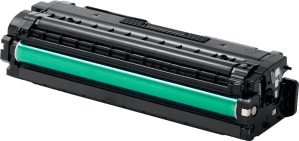

We are a one stop solution for all your printing requirements. We specialize in compatible toners and cartridges, as well as providing printer management solutions.


Replacing a toner cartridge too early wastes usable supplies. Waiting too long can interrupt urgent work, produce unreadable documents and make a small warning become a larger maintenance issue.
The right replacement point depends on the printer’s alert, cartridge condition, document quality and expected workload. Compare the printer alert with the printed page.
Most laser printers display messages such as “Low Toner,” “Replace Toner” or “Toner Empty.” Treat a low-level warning as a planning signal rather than an automatic instruction to change the cartridge immediately.
Some devices continue producing acceptable pages after the first alert, while others reduce output quality sooner. If the screen says the cartridge is empty, follow the model’s instructions and check whether a temporary continue option is intended for that device.
Do not repeatedly shake or reset a cartridge to extend its life without checking the manufacturer’s guidance. It may create uneven distribution, leaks or unnecessary handling.
Visible output often provides the clearest evidence. Replace a cartridge when pages show persistent symptoms such as:
Print a test page and compare it with a recent document. If the problem appears only in one file, inspect the document, driver and selected print mode before blaming the cartridge.
A single poor page may result from paper, a temporary distribution issue or a printer component. Repeated defects across different documents provide stronger evidence that action is needed.
Not every print-quality problem means the toner is finished. Some printers use a separate drum, transfer unit, fuser or waste-toner container. A worn drum can create repeating marks even when the cartridge still contains powder.
Check the exact consumables arrangement for your model. If the printer displays a drum or maintenance message, replacing only the toner may leave the defect unresolved.
A cartridge that still produces acceptable pages may not be suitable for an important deadline. If your team is preparing tenders, exam materials or client documents, arrange a replacement before the current supply becomes unpredictable.
Estimate remaining demand using recent usage rather than the box’s advertised yield alone. Large images, heavy colour coverage and frequent reprints can consume toner faster than routine text documents.
Keep one matched spare for critical or high-volume devices when delivery lead times could affect operations. Store cartridges sealed, away from heat, moisture and direct sunlight. Do not stock excessive quantities if models or cartridge codes change regularly.
Match the complete printer model and cartridge code before ordering. Confirm colour, yield, chip requirements, drum arrangement and warranty or replacement terms.
When comparing supplies, consider output, cost, availability and interruption. Express Computers offers printer toner supplies across the UAE and compatible cartridge options for different business requirements.
Prepare the new cartridge before removing the old one. Follow the printer’s handling instructions, protect the work surface and avoid touching sensitive imaging areas.
After installation, print a configuration or test page. Check density, alignment, colour and paper movement. If the printer reports an error, confirm that protective packaging was removed and that the cartridge is seated correctly.
Keep the old cartridge aside until the new one has passed testing. Dispose of or return it through the supplier’s recycling process where available.
Frequent warnings across several devices may indicate a wider supply-management problem. A managed print service can help businesses review usage, replenishment and device performance together.
For available product categories, review the Express Computers catalogue. For model-specific advice, contact the team with your printer details and recent symptoms.
Not always. Print a test page and assess the output. Plan a replacement if quality is declining or an important workload is approaching.
Check that the cartridge is seated correctly and protective materials were removed. If fading continues, inspect the drum, transfer system, paper and print settings.
Yes, if it remains sealed and is stored in suitable conditions. Match the code before use and avoid keeping stock that may become obsolete.
Gentle movement may temporarily redistribute powder in some designs, but it does not restore an empty cartridge. Follow the device instructions and replace it when output becomes unreliable.
Ask your supplier whether it accepts returns or provides recycling. Keep used cartridges sealed during storage to reduce spills and unnecessary waste.
Use the printer message, printed output and workload together. When quality becomes unreliable, the correct model-specific replacement protects productivity, reduces reprints and keeps important business documents consistently presentable.